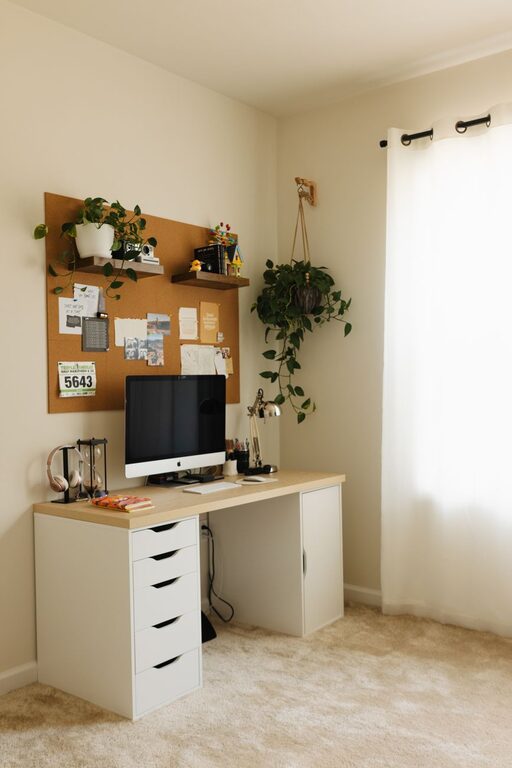




Creating a home workspace that feels cozy yet productive can make a significant difference in your daily work experience. Whether you’re working remotely full-time or occasionally need a quiet spot to tackle tasks, a well-designed space supports focus, creativity, and well-being. Here are practical tips to help you transform any corner of your home into a comfortable and efficient work area.
Choose the Right Location
Find a Quiet Spot
Look for a space in your home with minimal distractions and good privacy. This might be a spare room, a quiet corner in the living room, or an area near a window that lets in natural light. The key is to have a dedicated area that signals “work time” to your brain.
Consider Your Commute (Even at Home)
Even though you skip the traditional commute, setting up your workspace away from places associated with relaxation—like your bed or couch—helps maintain a clear separation between work and leisure.
Focus on Ergonomics
Invest in a Comfortable Chair
A supportive chair can prevent discomfort and posture problems. Look for adjustable options that provide good back support and allow your feet to rest comfortably on the floor.
Optimize Desk Height and Monitor Position
Your desk should allow your elbows to rest at a 90-degree angle while typing. Position your computer screen at eye level to reduce neck strain.
Use Ergonomic Accessories
Consider wrist rests, footrests, and keyboard trays if you spend many hours working. These small additions improve comfort and reduce fatigue.
Organize and Declutter
Keep Essentials Within Reach
Store frequently used items like pens, notebooks, and chargers nearby to avoid distraction or lost time searching.
Use Storage Solutions
Shelves, drawers, and desk organizers help keep surfaces tidy. Label containers if needed for quick identification.
Regularly Declutter
Spend a few minutes at the end of each day tidying your workspace. A clean area helps you start fresh the next day with reduced stress.
Personalize Your Space
Add Comforting Elements
Incorporate soft textures like cushions, a cozy throw blanket, or a small rug underfoot. These touches make your space inviting and comfortable.
Use Plants
Plants improve air quality and bring a bit of nature indoors, which can boost mood and creativity.
Display Inspiring Items
Photos, artwork, or motivational quotes can personalize your workspace and keep you inspired during work hours.
Control Lighting
Maximize Natural Light
Position your desk near a window when possible. Natural light helps reduce eye strain and elevates mood.
Balance with Artificial Lighting
Use adjustable desk lamps or overhead lights to ensure your workspace is well-lit, especially during early mornings or evenings.
Avoid Glare
Arrange your screens and lighting to minimize glare, which can cause headaches and reduce visibility.
Minimize Noise Distractions
Use Noise-Canceling Headphones
If your home is noisy, headphones can help you focus and create a sense of separation.
Play Background Music or White Noise
Some people benefit from gentle music or white noise to drown out distracting sounds.
Consider Soundproofing
Rugs, curtains, and wall hangings can absorb noise. If possible, seal gaps in doors or windows to reduce outside noise.
Establish Boundaries and Routine
Set Work Hours
Define clear start and end times to help distinguish work time from personal time.
Communicate Boundaries
If you live with others, make sure they understand your work schedule and the need for quiet during those hours.
Take Breaks
Regular breaks improve productivity and reduce burnout. Use techniques like the Pomodoro method (25 minutes work, 5 minutes break) to stay on track.
Invest in Technology and Tools
Reliable Internet Connection
A stable connection is critical for smooth remote work, video calls, and online collaboration.
Quality Equipment
Headsets, webcams, and keyboards designed for comfort and usability can enhance your work experience.
Use Productivity Apps
Task managers, calendars, and note-taking apps can help you organize tasks and deadlines efficiently.
Keep Comfort in Mind
Control Room Temperature
Use fans, heaters, or open windows to maintain a comfortable room temperature throughout your workday.
Stay Hydrated and Snack Smartly
Keep water nearby and choose healthy snacks to maintain energy levels.
Dress Comfortably but Professionally
Wearing clothes that are comfortable yet suitable for video calls can help switch your mindset into “work mode.”
—
By paying attention to both comfort and organization, you can create a home workspace that invites you to focus and enjoy your work. Start small by adjusting one or two elements, and gradually build a space that supports your productivity while feeling cozy and welcoming. With the right setup, working from home can be both efficient and enjoyable.